“These 50 Canva Label Layouts: Cream Backgrounds, Blue Botanicals, Fine Borders (Digital Download) designs are so lovely. I wanted my packaging to feel a little more put together, and this was exactly the look I had in mind.”
01 / 10
Printed examples shown. Your purchase is a digital template collection.
Make it yoursPersonalize in Canva50 layoutsOne coordinated collectionDigital downloadNo physical shipping
50 layouts. One beautiful look.
Your brand, your details. Personalize in Canva.
ONE-TIME PURCHASE50 Canva Label Layouts: Cream Backgrounds, Blue Botanicals, Fine Borders (Digital Download) Label Templates
Make your packaging feel like your brand with coordinated botanical label templates you can personalize in Canva.
Made for your brand. Editable in Canva.
$25 USDOne-time purchase
- 50 coordinated, mixed-format label layouts
- Personalize your text and brand details in Canva
- Editing & print guidance included
“These 50 Canva Label Layouts: Cream Backgrounds, Blue Botanicals, Fine Borders (Digital Download) designs are so lovely. I wanted my packaging to feel a little more put together, and this was exactly the look I had in mind.”1 / 5 · Design preview
Digital deliveryEdit in CanvaSecure checkout
Checkout with Fourthwall · Tax calculated at checkout
50 layouts · $0.50 per layout
What exactly am I buying?
A digital collection of 50 editable 50 canva label layouts: cream backgrounds, blue botanicals, fine borders (digital download) label layouts in the Blue Botanical style. Printed labels, products, containers and photography props are not included.
Will these fit my packaging?
This is a mixed-format collection. Check the preview gallery and layout dimensions against your packaging before printing. Every layout is not supplied in every size.
How do I edit and print them?
Open the supplied templates in Canva, replace the wording with your details, check the dimensions and export your finished designs. Arrange your own printing using suitable label paper or a print service.
Where will I find my templates?
After checkout, follow the download or access instructions from Fourthwall. See our digital delivery guide if you need help locating them.
DESIGNED TO BELONG TOGETHERTHE FINISHING TOUCH, ALREADY STARTED
A beautiful finish for the things you make.
A beautiful product deserves a considered presentation. Start with a coordinated design, then bring in the details that make it yours.
One collection. A coordinated look.
- 50 label layouts in the Blue Botanical style
- A mix of formats for different packaging needs
- Canva templates plus editing and print guidance
FROM TEMPLATE TO YOUR FINISHING TOUCH
Your brand. In three simple steps.
Keep the beautiful starting point. Make the details your own.
01
Open in Canva
Access the supplied templates and choose a layout for your packaging.
02
Add your details
Personalize your brand name, product wording and contact information.
03
Print your final design
Check the dimensions, export your design and arrange your own printing.
A LITTLE CLARITY BEFORE YOU CHOOSE
One collection or two?
Find your starting point.
Start with the packaging you need now, or bring two product lines together. Both options are a one-time purchase.
| Your options | SelectedSingle collectionOne product line | Build your duoA wider product range |
|---|---|---|
| Complete collections | 1 | 2 |
| Editable layouts | 50Mixed formats | 10050 in each collection |
| Your designs | 50 Canva Label Layouts: Cream Backgrounds, Blue Botanicals, Fine Borders (Digital Download) | 50 Canva Label Layouts: Cream Backgrounds, Blue Botanicals, Fine Borders (Digital Download)+ 50 Editable Canva Pet Treat |
| Text editing in Canva | Included | Included |
| Editing & print guidance | Included | Included |
| One-time priceBefore applicable tax | $25.00$0.50 per layout | $50.00$0.50 per layout |
| Choose single | Choose duo |
Prices in USD. Digital templates only. Printing and packaging are arranged separately. The duo combines two full collections at their listed prices.
A CLOSER LOOK AT THE DETAILS
One visual story.
Every little detail.
Fine botanical borders. Warm ivory backgrounds. Inky blue details. Give your packaging a shared visual identity, with room for your own story.
- 50
- coordinated layouts
- Canva
- edit your wording
- Digital
- no physical shipping
CUSTOMER REVIEW DESIGN
A little love
for the details.
Design preview Illustrative sample content, not verified customer feedback.
5.0
5 sample reviews
50 Canva Label Layouts: Cream Backgrounds, Blue Botanicals, Fine Borders (Digital Download) collection“I was nervous about editing a template, but changing the wording in Canva felt much easier than starting from a blank page. Really happy with the result.”
“The little botanical details are my favourite part. Pretty without feeling too busy, and everything looks like it belongs together.”
“Having a design to start with saved me so much second-guessing. I could spend my time getting my own wording right instead of trying to design the whole thing.”
“Such a nice finishing touch for my small business. I kept coming back to this style, and I love seeing my own brand name in the design.”
Swipe to explore the review layout
FEEL GOOD ABOUT YOUR CHOICE
A few things
you might ask.
Need help choosing your collection?
Ask the studioWhat comes with this collection?
50 coordinated 50 canva label layouts: cream backgrounds, blue botanicals, fine borders (digital download) label layouts to personalize in Canva, with editing and print guidance. The preview images show examples of the designs in use.
Will anything be shipped to me?
No. This is a digital template purchase. Printed labels, products, packaging and photography props are not included.
Are all 50 layouts the same size?
No. The collection includes mixed formats; every layout is not supplied in every size. Review the previews and check dimensions against your packaging before printing.
Can I use these for products I sell?
Review the product information and included usage terms before purchasing. You are responsible for your final wording, product details and any labeling requirements that apply to your business.
Read the full product description
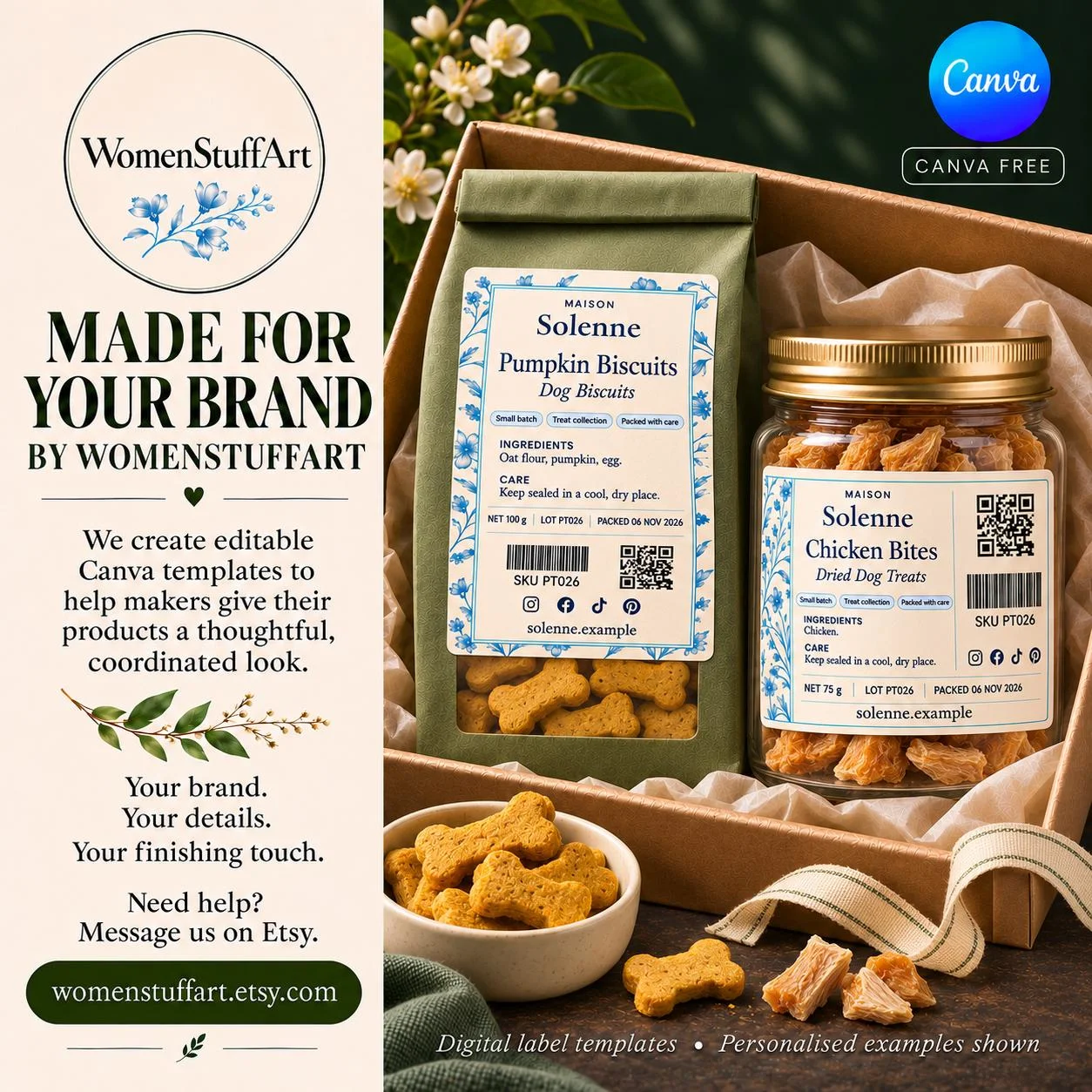
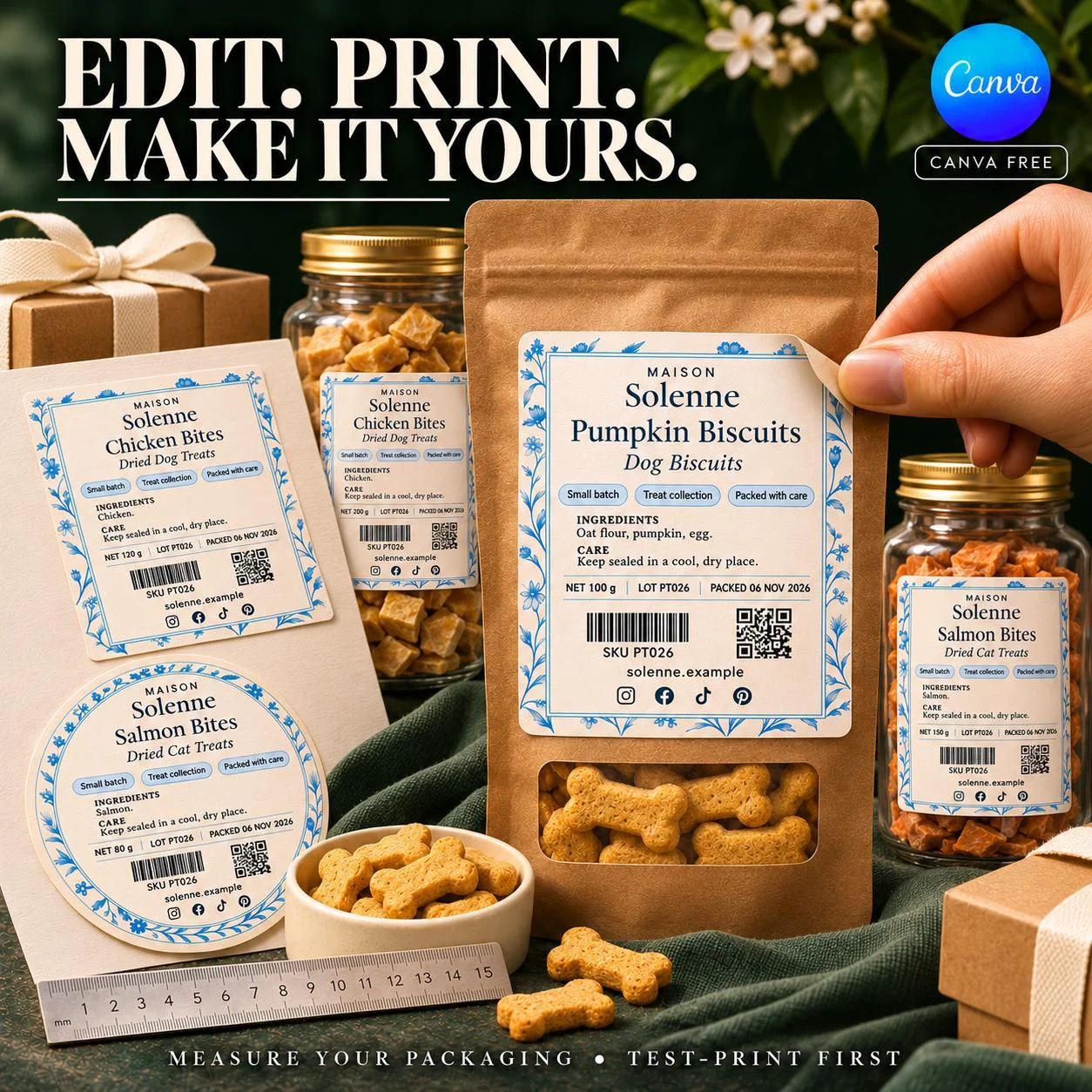
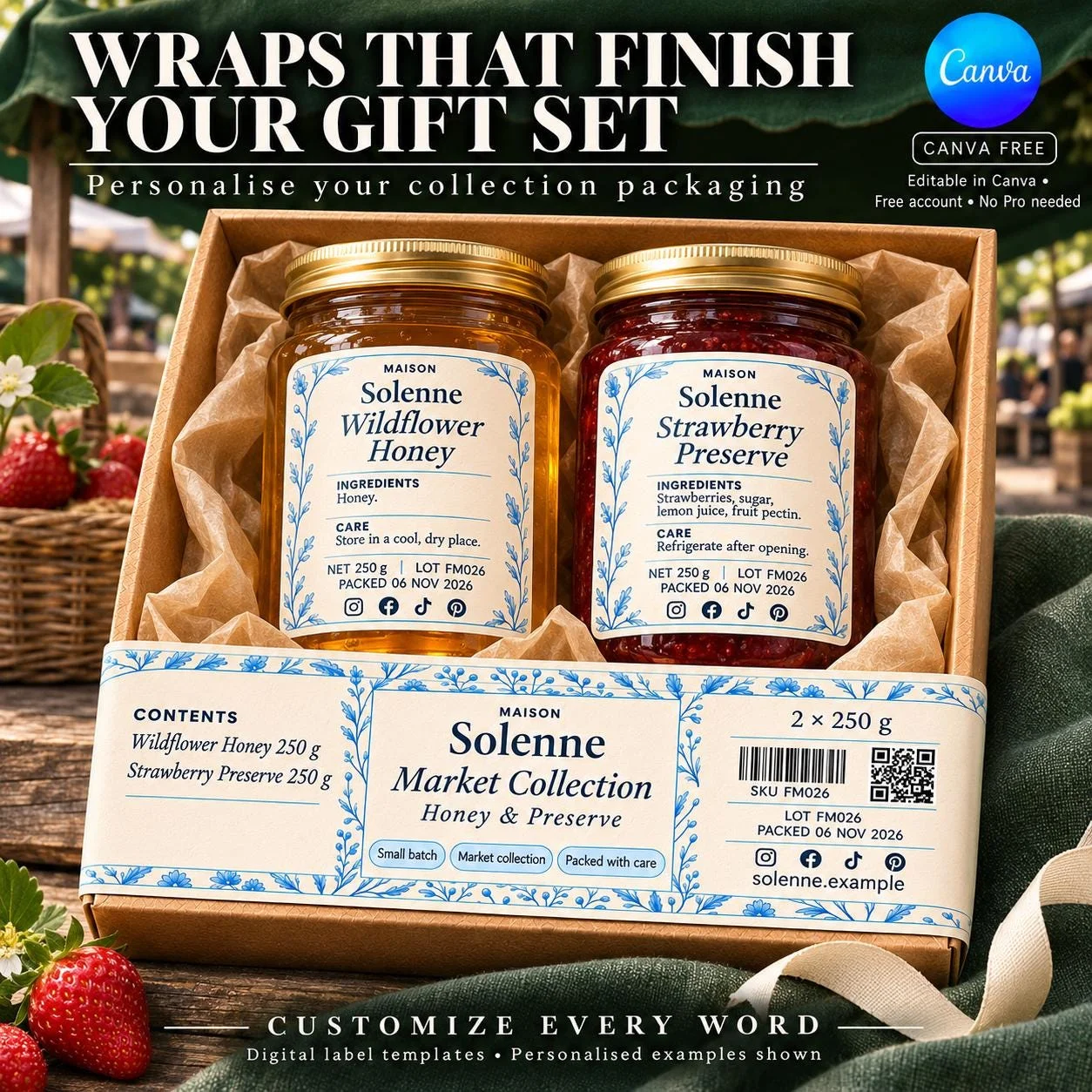
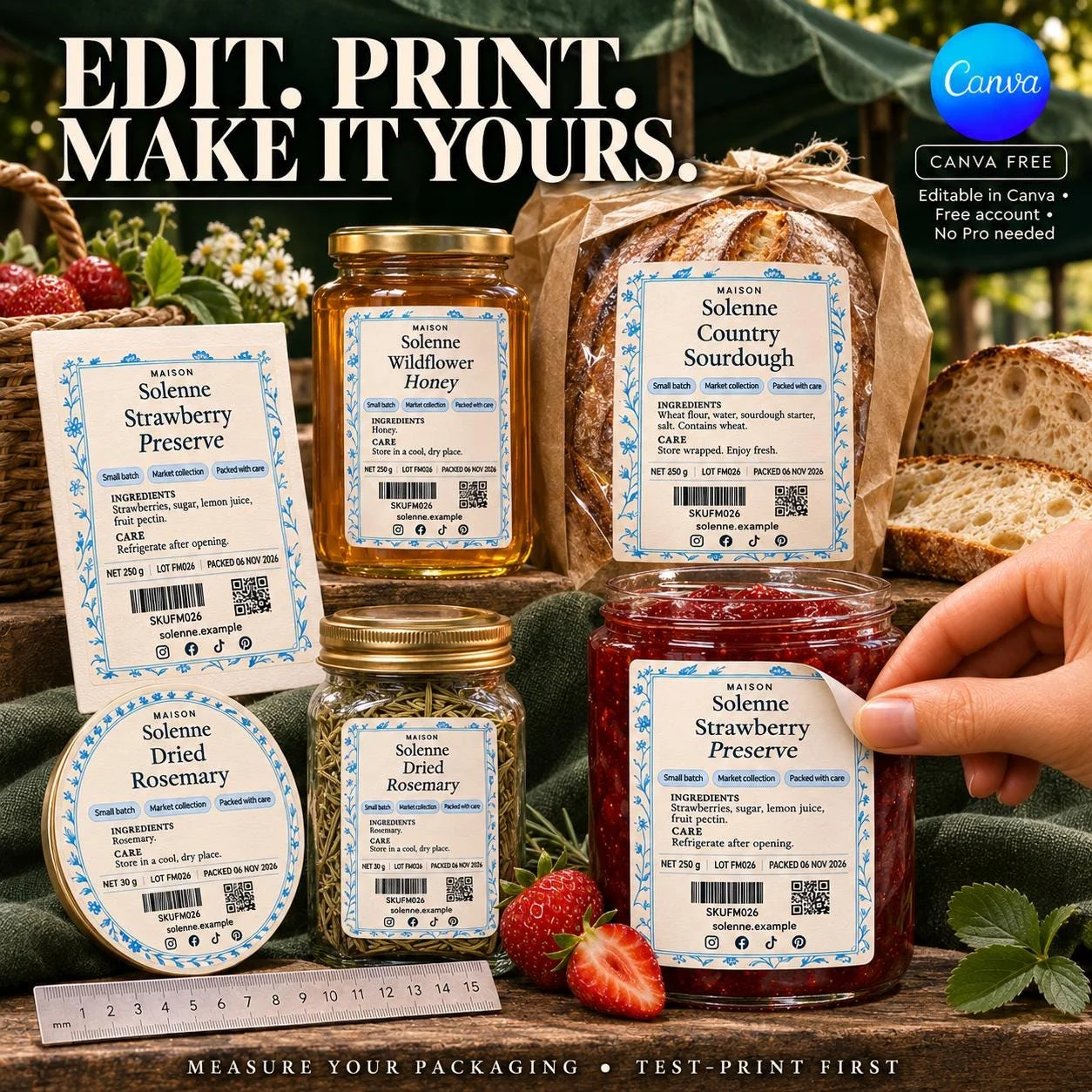
Bring a coordinated look to your market stall with 50 editable farmers market label templates for Canva. Cream backgrounds, delicate blue botanicals and fine borders connect your bread bags, preserve jars, honey packaging and herb pouches under one recognizable brand. Personalize a label for your signature product, then carry the same visual identity across different containers, seasonal batches and gift collections. Your product names, ingredients and business details become part of a consistent packaging range. DIGITAL DOWNLOAD • EDITABLE IN CANVA FREE CANVA ACCOUNT • NO CANVA PRO REQUIRED You are purchasing digital label templates. No food, ingredients, jars, bags, bottles, boxes, printed stickers, label stock or printing services are included. ──────────────────── WHAT YOU RECEIVE ──────────────────── Access to 50 coordinated Canva-editable label layouts in one cream-and-blue botanical theme: • 8 square layouts • 8 round lid and seal layouts • 10 rectangular front and back layouts • 6 oval and soft-shape layouts • 10 container wraps and packaging bands • 4 closure, header and reorder strips • 4 information, batch and order layouts This is one coordinated design collection with 50 variations in shape, size and information arrangement. Some dimensions repeat because the layouts serve different purposes. The gallery shows selected layouts personalized for farmers market vendors. You receive the original editable template fields to adapt for your own products, rather than 50 separate branding styles or 50 prewritten food products. ──────────────────── ONE STALL. A COORDINATED COLLECTION. ──────────────────── Use suitable layouts to bring your everyday products, seasonal releases, smaller batches and gift packaging together. Adapt the editable wording for: • Honey jars and containers • Jam and preserve jars • Bread bags and bakery boxes • Dried herb and seasoning pouches • Packaged cookies and other baked goods • Compatible produce packaging • Sample packs and collection boxes • Round lid stickers and seals • Wrap labels and gift-box bands • Ingredient, storage and batch panels The collection suits independent makers, farm stands, market stallholders, cottage food businesses and small product brands creating their own coordinated packaging. Choose the layouts that fit your actual containers and information. A jar label, a bread-bag label and a gift-box band can share the same visual theme while serving different practical jobs. ──────────────────── MAKE THE DETAILS YOURS ──────────────────── Replace the example identity and editable wording with your brand name, product name and accurate product information. Depending on the layout and available space, personalize fields for: • Farm, maker or business name • Product name and variety • Flavor or collection name • Short product description • Ingredient and allergen information • Appropriate storage or care wording • Net quantity • Batch or lot details • Relevant dates • Website and social information Adjust wording, fonts, text colors and the arrangement of editable elements in Canva. Keep the blue botanical theme for a coordinated range, or replace image assets with your own artwork. The botanical illustrations are image assets that you can move or replace. Their individual drawn strokes are not separate editable vector elements. Start with one product and check its label at the finished print size. Once the wording and layout work, use your chosen brand details and type choices across matching formats. ──────────────────── QR, BARCODE & SOCIAL ELEMENTS ──────────────────── Example code graphics and social elements demonstrate where your business information can appear. Replace demonstration QR codes, barcodes and social details with your own appropriate graphics and information. Test replacement codes on a printed proof before producing a full batch. The collection does not generate registered retail barcodes, verify product data or automatically connect a QR code to your website. ──────────────────── INCLUDED SIZES & SHAPES ──────────────────── Dimensions are width × height, except round labels, which are listed by diameter. Some sizes appear in more than one layout. SQUARES — 8 LAYOUTS 50 × 50 mm; 60 × 60 mm; 80 × 80 mm; 2.5 × 2.5 in; 3 × 3 in; 3.5 × 3.5 in; 4 × 4 in. ROUND LABELS — 8 LAYOUTS 50 mm, 60 mm and 80 mm diameter; 2.5 in, 3 in, 3.5 in and 4 in diameter. RECTANGLES — 10 LAYOUTS 2 × 3 in; 3 × 4 in; 4 × 2 in; 4 × 3 in; 3 × 4.5 in; 2 × 4.5 in; 5 × 2 in; 4 × 4.5 in; 64 × 38 mm; 80 × 45 mm. OVALS & SOFT SHAPES — 6 LAYOUTS Horizontal oval: 4 × 2.5 in Vertical oval: 2.5 × 3.5 in Tall arch: 3 × 4 in Short arch: 3 × 3.5 in Scalloped shape: 3.5 × 3.5 in Rounded rectangle: 4 × 3 in WRAPS & PACKAGING BANDS — 10 LAYOUTS 6 × 2.5 in; 7 × 2.5 in; 8 × 3 in; 7.75 × 2.25 in; 9.75 × 1.25 in; 5 × 2 in; 8.5 × 3.5 in; 10 × 2.5 in; 12 × 3 in; 7 × 3.5 in. CLOSURE, HEADER & REORDER STRIPS — 4 LAYOUTS 6 × 1.25 in; 1.5 × 6 in; 5 × 1.75 in; 4 × 1.5 in. INFORMATION & ORDER PANELS — 4 LAYOUTS 3 × 3 in; 4 × 3.5 in; 3 × 2 in; 4 × 3 in. Measure the usable flat area of your packaging before selecting a layout. Check curved shoulders, tapered sides, lid rims, seams and wrap overlap. Product weight alone does not determine label size. The collection supplies the listed dimensions; it does not promise every possible size, universal fit or automatic resizing. ──────────────────── HOW TO ACCESS & EDIT ──────────────────── 1. Purchase the digital collection on Fourthwall. 2. Use the download link in your Fourthwall order email to access the PDF. 3. Follow the Canva access link in the file and sign in to Canva. 4. Personalize the original template fields with your brand and product information. 5. Export the finished artwork in the format requested by your printer. 6. Test-print, check the fit and details, then print and apply your labels. The included templates are intended for a free Canva account; Canva Pro is not required. Premium content you choose to add yourself may have separate access requirements. ──────────────────── PRINTING & MARKET-DAY FINISHING ──────────────────── Print with compatible label stock and your home printer, or work with a professional label printer. Confirm the required file format, finished dimensions, bleed and trimming before ordering a full run. Review product names, ingredients, allergens, quantities, dates, contact information and small-text readability at actual print size. Choose stock and adhesive appropriate to your packaging and the conditions it will encounter, such as handling, moisture, refrigeration or condensation. The digital design itself does not make a printed label waterproof or guarantee adhesion. Colors can vary between screens, printers and label materials. Test the print, fit, finish and replacement codes on your actual jar, bag or box before producing a full batch. ──────────────────── HELPFUL ANSWERS ──────────────────── CAN I USE MY OWN FARM OR BUSINESS NAME? Yes. Replace the example identity and editable wording with your own brand and product information. DO I NEED CANVA PRO? No. The included templates are intended for a free Canva account. Premium elements you add yourself may have separate requirements. ARE THESE PRINTED LABELS? No. This is a digital template collection. You arrange printing using your chosen materials or print service. DO I HAVE TO SELL THE PRODUCTS IN THE PHOTOS? No. Honey, strawberry preserve, sourdough and rosemary are illustrative personalizations. Use your own product names and accurate information. IS DONE-FOR-YOU PERSONALIZATION INCLUDED? No. You personalize the template fields yourself in Canva. Custom design or editing services are not included. DOES THIS INCLUDE MARKET SIGNS OR PAYMENT SYSTEMS? This collection contains label and packaging layouts. Market furniture, large signs, pricing boards, payment services and checkout systems are not included. Replace demonstration codes with your own appropriate assets. DOES THIS MAKE MY FOOD LABEL COMPLIANT? The collection supplies design layouts, not food-label approval, tested recipes, nutrition calculations, canning instructions or a shelf-life assessment. Add the accurate ingredient, allergen, storage, business and other information appropriate to your products and selling market. ──────────────────── ABOUT THE PREVIEWS & WOMENSTUFFART ──────────────────── Listing imagery includes AI-generated product mockups showing selected personalized layouts. Packaging proportions, paper texture, contents and colors are illustrative. The original template artwork is the starting point for your edits. Example ingredient and storage wording demonstrates layout only. Replace it with accurate information for your own products. Any reviews shown are identified as reviews of other WomenStuffArt products, not reviews of this farmers market collection. WomenStuffArt creates editable templates to help makers give their products a thoughtful, coordinated identity. Your product names, brand details and finishing choices make the collection your own. Need help with your purchase? Contact the store using your Fourthwall order confirmation. Start with your signature product. Build a coordinated look across your market stall.
FOR THE REST OF YOUR COLLECTION